Address
304 North Cardinal St.
Dorchester Center, MA 02124
Work Hours
Monday to Friday: 7AM - 7PM
Weekend: 10AM - 5PM
Address
304 North Cardinal St.
Dorchester Center, MA 02124
Work Hours
Monday to Friday: 7AM - 7PM
Weekend: 10AM - 5PM


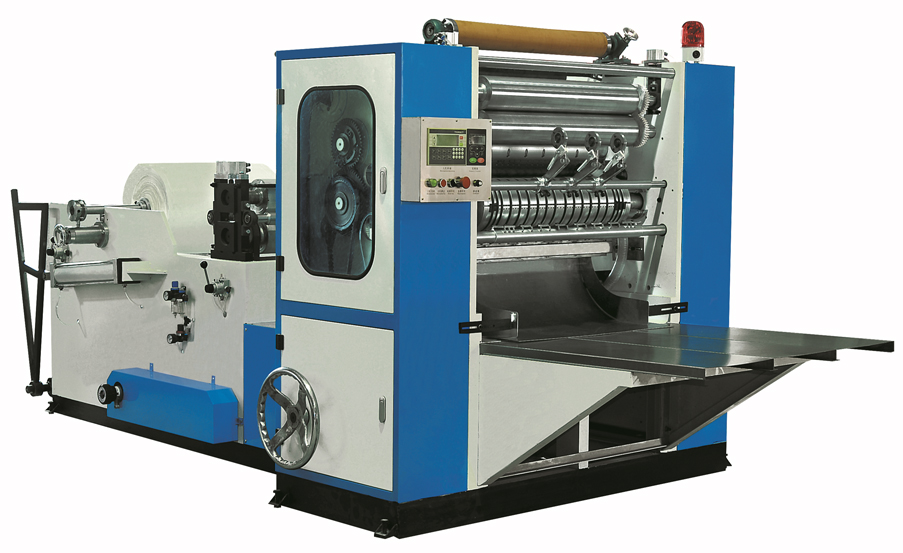
Application:
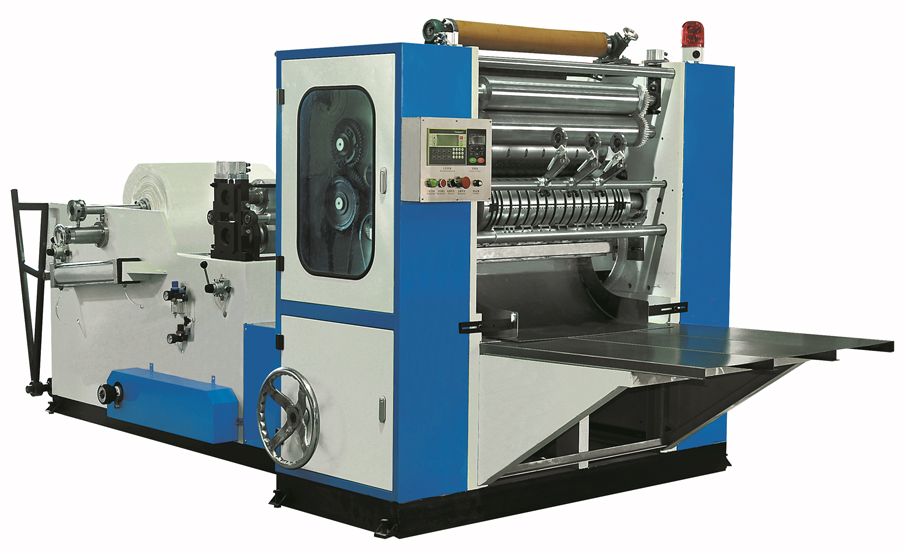
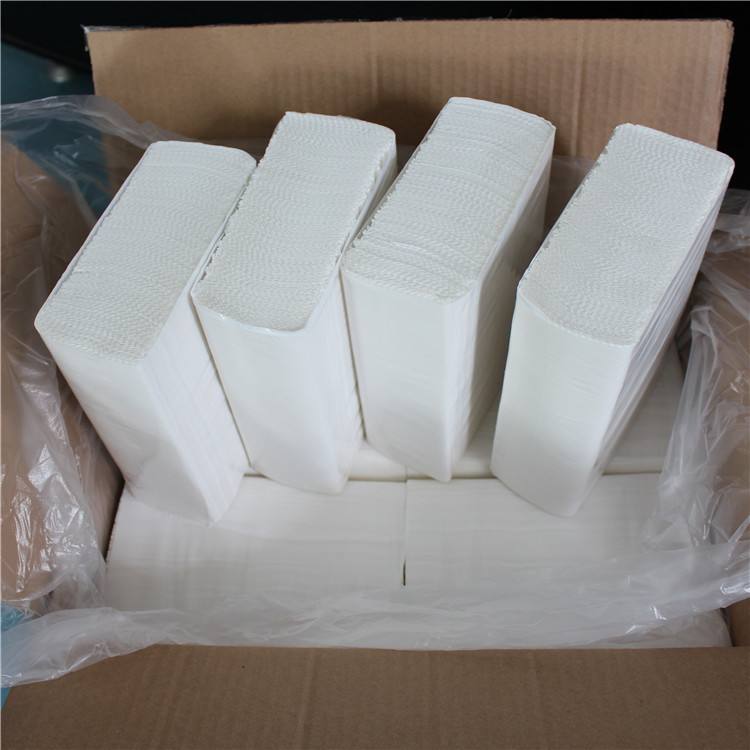
N folding hand towel machine processes paper material after embossing,cut off,interfold become N fold,The products are widely used in hotels, office and kitchen and so on,convenient health.This machine can folding,slitting,counting,with high speed,output orderliness.
Chat via Whatsapp
Function and characteristics
Model: HX-N-230/2L/3L/4L/5L
The main technological parameters
| HX-N-230/2L/3L/4L/5L | ||||
| Finished products size | 230(L)X230±2mm Other sizes are available | |||
| Raw material size | 460mm | 690mm | 920mm | 1150mm |
| Raw material core diameter | 76.2mm Other sizes are available | |||
| Speed | 0-100m/min (Depending on the machine model ) | |||
| Power | Frequency conversion speed regulator | |||
| Programmable controller | PLC computer controller | |||
| Folding type | Vacuum suction “ N” fold | |||
| Transmission unit | Timing belt | |||
| Counter | Ink marked | |||
| Embossing unit | Streel to steel | |||
| Slitting unit | Pneumatic dot slitting | |||
| Pneumatic system | 3HP Air compressor,mini air pressure 5 kg/cm2 (provided by customer) | |||
| Total power | 14KW | 18KW | 19KW | 24KW |
| Dimension | Depends on Machine Model | |||
| Weight | depend on the size and configure |






Fantastic post for anyone considering a remodel or building and construction job. Collaborating with expert basic contractors in Denver helps ensure top quality handiwork and much better sychronisation from start to finish. General Contractor Denver
This was a fantastic resource. Check out affordable SEO agency for more.
This was highly useful. For more, visit Superior Emergency Restoration LLC company .
Your information on working out last fees was eye-starting; many first-time shoppers fail to remember this ingredient absolutely! Gold Coast buyers agent Savvy Fox
I think choosing the right wall height and layout is just as important as choosing the material. Good design improves both strength and appearance. More tips are at rock retaining walls vernon .
Are grateful for this blog post, it’s tough to find good information and facts on the internet
Touring unannounced is such a smart tip. I’ll be referencing that idea on my assisted living comparison page on senior living .
Your post makes it easy to understand what to look for in Porta Potty Rental East Bridgewater services. https://yourlink.com
Um cuidado relevante é sobre nr / nr e r2v em studios. Vale checar a documentação da unidade. estúdio Zona Sul São Paulo
Πολύ χρήσιμο άρθρο για τις αποφράξεις! Για περισσότερες πληροφορίες, δείτε το βαθύς καθαρισμός αποχετεύσεων .
I loved as much as you will receive carried out right here.
The sketch is attractive, your authored subject matter stylish.
nonetheless, you command get bought an nervousness over that
you wish be delivering the following. unwell unquestionably
come more formerly again as exactly the same nearly a lot often inside
case you shield this increase.
Including current residents’ families in the conversation is a great idea. I’ll be adding that recommendation to content on elder care .
This is exactly the kind of guidance I needed about solar providers in Fairfield. I’ll explore Solar energy company .
It’s a pity you don’t have a donate button! I’d without a doubt donate to this excellent blog!
I guess for now i’ll settle for bookmarking and adding your RSS feed to my
Google account. I look forward to brand new updates and will talk about this website with my
Facebook group. Chat soon!
Hello, i think that i saw you visited my
web site so i came to “return the favor”.I am trying
to find things to improve my website!I suppose its ok to use a few of your ideas!!
The reminder that Nursing Homes are best for complex medical needs, while Assisted Living suits those who need help with daily tasks, really helps clarify options. I also found care-level checklists on elder care that were very useful.
Thanks for highlighting the importance of personal choice in daily routines. We focus on person-centered care models on assisted living .
Your advice about planning for future care needs is essential. That’s one of the most important topics we cover on assisted living .
What a stuff of un-ambiguity and preserveness of precious familiarity about unpredicted
feelings.
Networking with other investors is a sizeable means to study and develop inside the truly property container; I realise your emphasis on this level! Gold Coast buyers agent
Great reminder that strong drainage is simply as fundamental as effective materials. retaining walls vernon
Right here are 20 non-spam, valuable blog site remark examples you can adapt for Denver General Specialist conversations: Denver General Contractors
Helpful post for homeowners wanting a smooth solar installation experience in Sacramento. solar panel provider sacramento Sacramento, CA
Choosing a local mover can make communication and scheduling easier. Moreno Valley residents can look into Moreno Valley movers .
Really appreciate this content! I’m happy I took the time to read this. When I was looking around for Chinese shows recently, I found เว็บดูซีรี่ย์จีน and ended up discovering some titles I hadn’t seen before. Thanks for another interesting article!
Many people assume “all senior care is the same,” but your article makes it clear why memory care is more specialized. We’ve found the same misunderstanding and address it on memory care farmington nm .
I’ve seen how small assisted living homes create a family atmosphere where caregivers naturally step in to help with meals and hygiene. respite care seems aligned with that model of care.
Personalized bathing schedules, preferred hygiene products, and familiar routines are easier to honor in a small home setting. That kind of individual attention is what drew me to assisted living .
Heya i’m for the primary time here. I came across this board and I in finding It
truly useful & it helped me out much. I am hoping to provide one thing
again and aid others such as you helped me.
Great post! Anyone interested in คลิปหลุดสาวใหญ่ might want to check this out too.
Right here is the right web site for anyone who wishes
to understand this topic. You understand so
much its almost tough to argue with you (not that I personally would want to…HaHa).
You definitely put a new spin on a topic which has been discussed for decades.
Excellent stuff, just wonderful!
The reminder to check how often doctors or nurse practitioners visit is very useful. We recommend that question on senior care .
I appreciate the emphasis on involving the senior in the decision. They should have a say in where they live. I used conversation tips from assisted living to approach this topic more respectfully with my parents.
You could certainly see your enthusiasm within the article you write.
The sector hopes for even more passionate writers such as you who aren’t afraid to mention how they believe.
Always follow your heart.
This is a sturdy overview of the main everyday jobs in third celebration claims administrator roles. I’m posting my web page hyperlink for additional studying: BSA Claims third party claims administrator roles
This reads like a guidelines—fantastic points for everyone seeking to understand public adjuster how they work. BSA Claims services
We blended Athens subculture with Zakynthos beaches due to a tradition plan from most popular tours in Greece .
Great article. It’s surprising how much stress can be avoided just by doing a pre-move walkthrough with the movers. Steedy Naples Mover’s
A well-designed retaining wall can guide water movement and protect nearby planting areas. Drainage planning should always be included. More retaining wall details are at rock walls vernon bc .
”Engaging storytelling invitations readers experience trips relatable connecting emotionally overarching issues introduced all around articles.” ### anyKeyboard## Gold Coast buyers agent
If your Chesapeake business needs weekend relocation to minimize downtime, give local movers a call.
Simply desire to say your article is as amazing. The clearness in your publish is just great and i can assume
you’re knowledgeable in this subject. Fine together with your permission let
me to clutch your RSS feed to stay up to date with imminent
post. Thank you 1,000,000 and please carry on the enjoyable work.elegram
新手入门全攻略——从零开始掌握电报(800字)
如果你刚刚接触 Telegram,可能会觉得这款软件功能太多、界面不熟悉,不知道从哪里开始。别担心,telegram-save.com 为新手用户准备了从零开始的全面入门指南,覆盖了下载安装、账号注册、基本功能使用、隐私设置、群组频道探索等所有基础环节。读完这篇攻略,你就能像老用户一样熟练使用 Telegram 了。
第一步:下载安装。安卓用户可以通过 Google Play 商店搜索 “Telegram”
下载,或者从 Telegram 官网下载 APK 安装包。iPhone
和 iPad 用户在 App Store 中搜索 “Telegram” 即可。国内用户如果无法访问 Google Play,建议从官网下载,避免使用第三方应用市场的不安全版本。电脑用户则访问 Telegram
官网,选择 Windows、macOS 或 Linux 版本下载。安装过程非常简单,按照提示点击 “下一步” 即可。
第二步:注册账号。安装完成后打开 Telegram,点击 “Start Messaging” 或 “开始”。输入你的手机号码,注意选择正确的国家代码(中国大陆为 +86)。点击 “Next” 后,Telegram 会向你的手机发送一条包含验证码的短信(或语音电话)。输入验证码,然后设置你的姓名(昵称)和头像(可选)。姓名可以随时修改,头像也可以随时更换。注册完成后,你就拥有了自己的 Telegram 账号。
第三步:设置中文界面。默认情况下 Telegram 是英文界面,但你可以轻松切换为简体中文。在安卓或 iOS 设备上,进入
“Settings” > “Language”,选择 “简体中文”。如果列表中没有中文选项,请联系我们的网站获取官方语言包链接。电脑版同样在设置中切换语言。切换后,所有菜单都会变为中文,操作更方便。
第四步:添加联系人。Telegram 会自动同步你手机通讯录中已经注册了 Telegram
的联系人。如果你的朋友还没有注册,你可以通过邀请链接或直接分享你的 Telegram 用户名来添加。每个 Telegram 用户都可以设置一个唯一的用户名(例如 @yourname),其他人可以通过搜索这个用户名找到你,而无需知道你的手机号。
第五步:开始聊天。点击右下角的铅笔图标(或“新聊天”按钮),选择联系人或输入用户名开始对话。你可以发送文字、图片、视频、语音消息、文件、位置信息、联系人名片等。长按消息可以回复、转发、收藏或删除。Telegram 还支持编辑已发送的消息(长按消息选择“编辑”),这是一个非常实用的功能。
第六步:创建群组或加入频道。点击“新聊天”旁边的“新群组”可以创建自己的群组,添加成员。要加入公开群组或频道,可以在搜索框中输入关键词,或者直接点击别人分享的 t.me/xxx 链接。我们强烈建议你先加入一些高质量的频道,了解 Telegram 的内容生态。
第七步:隐私设置。这是新手最容易忽略但至关重要的一步。进入 “设置” > “隐私与安全”,将 “手机号码” 设为
“没有人”,“最后上线时间” 设为 “我的联系人”,开启 “两步验证”。这些设置能有效保护你的个人信息不被滥用。具体操作方法可以参考我们网站的隐私专题。
telegram-save.com 的全攻略还涵盖了语音视频通话、机器人(Bot)使用、已保存消息技巧、自动下载设置等进阶内容。无论你是想用 Telegram 进行日常聊天、办公协作,还是获取资讯、学习知识,我们的攻略都能让你在最短时间内掌握所有基础操作。现在就访问网站,开启你的 Telegram 之旅,体验这款全球顶尖通讯软件的魅力吧!
Telegram 中文版设置教程——轻松告别英文界面(800字)
Telegram 作为全球领先的即时通讯软件,凭借其强大的安全性和丰富的功能吸引了数亿用户。然而,对于许多国内用户来说,首次打开 Telegram 时看到的全英文界面往往会带来一定的使用障碍。菜单、设置选项、聊天功能全部以英文显示,这让不熟悉英语的用户感到无所适从。其实,Telegram 原生支持中文界面,只需简单几步操作,就能将界面语言切换为简体中文。telegram-save.com 为你带来了最详尽的中文版设置教程,无论你使用的是安卓手机、iPhone、Windows 电脑还是 Mac 电脑,都能在几分钟内轻松完成语言切换,让
Telegram 变得亲切好用。
首先来看安卓手机端的设置方法。打开 Telegram 应用,点击左上角的三条横线图标展开侧边菜单,然后点击 “Settings”(设置)。进入设置页面后,找到 “Language”(语言)选项并点击。在语言列表中,你会看到 “简体中文”
或 “Chinese (Simplified)”,选中它即可完成切换。整个过程不超过 30 秒。需要注意的是,部分旧版本 Telegram 的语言列表可能没有直接显示中文选项,此时你需要先更新应用到最新版本,或者通过第三方语言包链接进行设置。telegram-save.com
也提供了官方的中文语言包链接,一键点击即可自动切换。
对于 iPhone 和 iPad 用户,操作同样简单。打开
Telegram,点击右下角的 “Settings”,然后点击 “Language”,在列表中选择 “简体中文”。iOS 系统的
Telegram 界面会立即变为中文,所有菜单、按钮和提示信息都会同步更新。如果你使用的是 Telegram Desktop 电脑版,操作也非常直观:点击左上角的三条横线打开菜单,选择 “Settings”,然后在 “Language” 下拉菜单中选择 “简体中文” 即可。电脑版的语言切换是实时生效的,无需重启应用。
成功切换中文界面后,你会发现整个 Telegram 的操作变得清晰起来:聊天列表、联系人、群组管理、文件发送、隐私设置等所有功能都以中文显示。你可以更轻松地找到 “已保存消息”、“新建群组”、“设置两步验证” 等重要功能。telegram-save.com 还特别提醒用户:如果在语言列表中没有找到中文选项,可能是因为你的软件版本过旧,或者网络原因导致语言包未能及时加载。此时建议先检查更新,或者切换一下网络环境(例如从 WiFi 切换到移动数据)再重新打开设置页面。另外,部分第三方修改版 Telegram 可能存在语言包不完整的问题,建议从官网或官方应用商店下载正版应用。
中文界面的设置不仅仅是为了看得懂菜单,更是为了提升日常使用效率和安全性。当你能够准确理解每一步操作的含义时,才能更好地配置隐私选项、管理群组权限、处理文件传输等高级功能。telegram-save.com 提供了带截图的完整图文教程,即使是完全不懂技术的新手也能跟着一步步操作成功。现在就访问 telegram-save.com,跟我们一起把
Telegram 变成你熟悉的母语界面,让沟通不再有语言障碍!
One more choice is 20 high-quality remark layouts where you include understanding, ask thoughtful inquiries, and just discuss your brand name naturally when pertinent. Denver General Contractors
Excellent post! I recently discovered a collection of เว็บโดจินเกาหลี while searching online.
Great post—solar providers in Rocklin should follow this kind of transparency. I’ll look at Rocklin, CA solar panel provider .
bokep, bokep indo, porn, website penipu, bokep 3gp, sex, porno, xnxx, website scam, scam,
penipu
This article makes comparing Stockton solar companies easier. I’ll use Solar energy consultation Stockton, CA as a next step.
Συμφωνώ απόλυτα ότι η σωστή τοποθέτηση (σκιά, απόσταση από φαγητό κλπ.) είναι κρίσιμη. Βρήκα ένα χρήσιμο take a look at listing τοποθέτησης στο Χημικές Τουαλέτες WC για εκδηλώσεις .
kraken market
The ability to quickly adapt care levels as a resident’s needs change is a big plus of small homes. That flexibility, especially with daily living support, is emphasized throughout senior care .